This post is mostly about the first one, because it changes who can use this.
What v15.1 makes possible
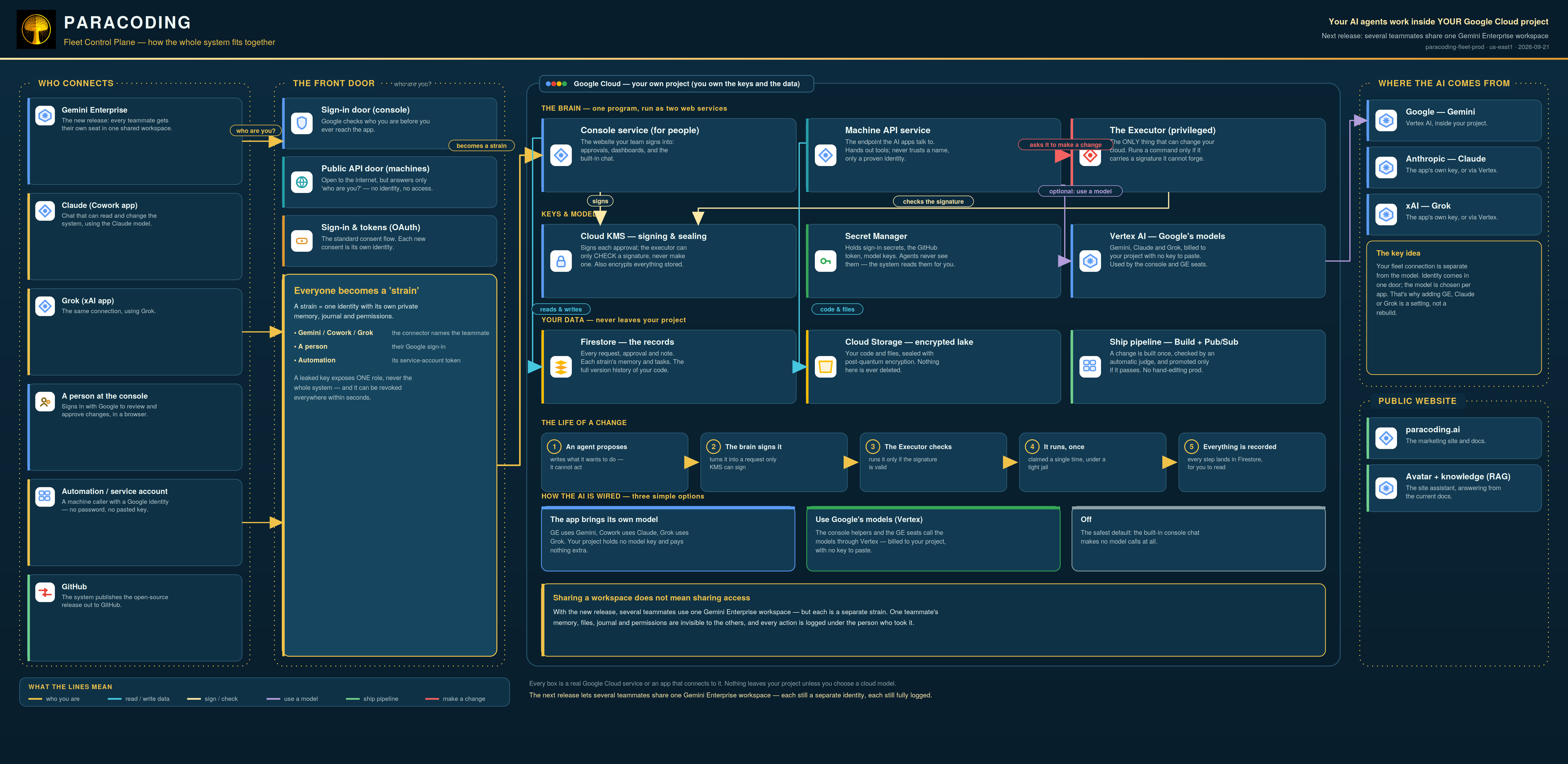
Point a Gemini Enterprise custom connector at your Paracoding MCP URL and a Gemini chat gets the same hands every other client gets — a git server, a memory graph, a journal, file storage, command execution, the raw GCP REST surface, and inter-agent messaging. Roughly 59 tools, over OAuth 2.1, against your project, on your bill, with your key.
No model ever holds a Google credential. Your client is the model; the connector makes no model call of its own. Gemini presents its connector binding, and the control plane resolves that binding to a role server-side.
How the connection actually works
- OAuth 2.1. Gemini Enterprise authenticates to the public, machine-facing MCP surface.
It has to be IAP-free — Identity-Aware Proxy eats the
Authorizationheader an MCP client needs, soPOST /mcpbehind IAP refuses every connector at the edge. - CSRF-protected consent. The consent that binds a Google account to the connector is protected against cross-site forgery, so granting a connector access to your project cannot be ridden from another tab.
- Per-connector identity. The control plane maps the binding —
oauth_client_idplusoauth_email— to a strain, and decides which strain a turn runs as from that binding, on the server, every turn. - Durable sessions, re-verified in flight. A Gemini Enterprise user session is re-verified against Google inside its lifetime, instead of being trusted for seven days on a single check at sign-in. Durable, without becoming stale trust.
One strain by default — multi-user by binding
This is the honest shape of it, and it is worth stating plainly rather than marketing around.
Out of the box, everyone shares one identity. Every teammate you add to the Gemini
Enterprise application inherits the single Google account that consented to the connector, and
executes as one bound strain (fleet-curator on our own fleet) carrying the full tool
surface. Powerful, shared, and exactly right for a single operator accelerating their own loop.
Genuine multi-user is a binding, not a mode. Map each teammate's Google account to their
own strain — their oauth_email under strains — and each person
resolves to their own isolated strain, with its own memory, journal, permissions and
tool_classes. A leaked account then leaks one role, not the workspace. That per-user
binding is the designated way to open the door to a team; restricting the shared strain is not.
Building an agent for Gemini Enterprise with Paracoding
- Connect and consent. Add a GE custom connector pointed at your
/mcpURL and sign in with the Google account that should own it. - Give the agent its own identity. Bind that account (or each teammate's) to a strain, so the agent has scoped memory, a journal lane, and a permission set of its own — not a seat on someone else's.
- Arm the tools it needs, up front. Inside a GE chat, each fleet tool registers as its
own skill and GE preloads only two or three — so
load_skillthe rest before the agent needs them. Phrase every call as one sentence with the tool bound to the verb (use git_propose to land the change); naming a tool alone does not arm it. - Fence what it may do. Set
tool_classeson the strain (for example['read']) right in its record; an unset list means the full surface, on purpose. - Let other agents find it. Every strain publishes an A2A agent card at
/agents/{role}/.well-known/agent-card.json, discoverable by anything that speaks Agent2Agent — so a Gemini agent addresses a Paracoding strain the standard, vendor-neutral way.
The console's Flow Hood is where strains are created and where each per-strain session paste is generated. Adding a model or a person to the same fleet is a paste, not an integration — and because state lives in the project rather than the chat, work one agent does is visible to the next.
The posture, stated once
The keyless, flat-rate config that makes Gemini Enterprise painless — guardrails off,
confirmation cards suppressed — is an unreviewed, unrefused shell into your GCP surface for
whoever reaches the connector. That is the deliberate single-operator posture, and
SECURITY.md spells it out in full rather than dressing it up. If you are adding
people, bind them to their own strains and set their tool classes. The release tells you exactly
that.
The security review, in brief
A deep review found thirty issues; twenty-nine are fixed and serving, two are open by design. The ones worth naming:
- The guardrail switch now reaches the executor — the one service that runs privileged commands — not just the two that only talk.
- The console session secret is written owner-only, and its removal is checked.
- OAuth refresh tokens rotate on every use, with reuse-detection that revokes the chain.
- The passkey verifier reads the signature counter and checks the origin; the executor's unimplemented assertion path refuses by name rather than posing as a control.
- A revoked session key dies fleet-wide within seconds.
- The promotion re-read confirms the revision that was judged, not whatever holds traffic.
- Tool descriptions state what the system does and never instruct the reader what to tell a human — the honest-posture rule the whole review turned on.